Android widgets for Notion workflows

Notion tasks, Custom Views and calendar context on your Android home screen

Keep your Notion workflow visible and actionable without opening Notion all day.

Built for Notion users who want faster access, less app switching and a more focused daily view.

Google Play early accessAndroid 6+Built for Notion users

Early access is currently delivered through Google Play while the final subscription launch is being prepared.

Real widget preview
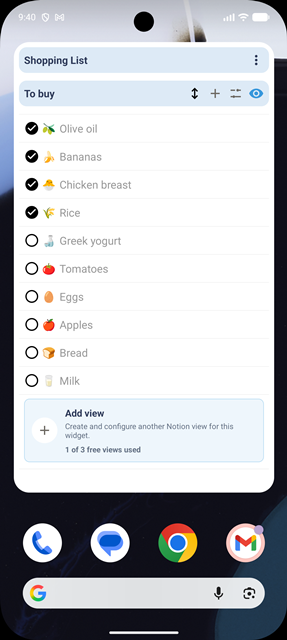
NotiZen Widget showing Notion Custom Views on an Android home screen
See today's tasks, selected Custom Views, reminders and calendar context before you open Notion.

What it does

A home screen layer for your Notion workflow

NotiZen Widget is for Notion users who want to see the important part of their workspace before opening an app.

Notion databases

Show the database rows you already use for tasks, projects and personal systems.

Custom Views

Turn focused Notion views into Android widgets for work, personal tasks or routines.

Reminders

Keep the next things you need to act on visible from your home screen.

Optional calendar context

Add Google Calendar events when your day needs schedule context next to Notion.

Setup

Set up your first Notion widget in 90 seconds

The setup video will show how to install NotiZen Widget, connect Notion, choose a database or Custom View, and add the widget to your Android home screen.

Setup in 4 steps

  1. 1

    Install NotiZen Widget from Google Play

  2. 2

    Connect your Notion workspace

  3. 3

    Choose a Notion database or Custom View

  4. 4

    Add the widget to your Android home screen

You can adjust colors, filters, views and integrations later from settings.

Early access installs and app updates are delivered through Google Play while the production launch is being prepared.

Product preview

See your Notion workflow before opening Notion

Custom Views on Android

Custom Views on Android

Show your Notion Custom Views as Android widgets.

Separate work and personal context

Separate work and personal context

Keep work, personal tasks and reminders visible from your home screen.

Google Play early access

Install, connect, keep visible

Install NotiZen Widget through Google Play, connect Notion, and keep useful views available on your Android home screen.

Benefits

Know what matters before you open an app

See today's tasks

Check the next tasks from your home screen without opening Notion first.

Use Custom Views

Turn Notion Custom Views into Android widgets for specific parts of your workflow.

Keep reminders visible

Put reminders where you will see them during normal phone use.

Add calendar context

Show optional Google Calendar events next to Notion when your schedule matters.

Pricing

Free during early access. Paid launch planned.

Free during early access. Planned launch price: €4.99/month after a 7-day free trial.

Early access

Install now for free

The final subscription launch is being prepared for Google Play Billing inside the Android app.

€4.99/month planned

After a 7-day trial at production launch

Access plan

  • Early access: free during testing.
  • Planned launch price: €4.99/month.
  • Planned offer: 7-day free trial after production launch.
  • Cancel anytime through Google Play once subscriptions are active.

Included in early access

  • Notion databases and task views on your Android home screen
  • Custom Views for focused workflows
  • Reminders and visible daily context
  • Optional Google Calendar context
Get it on Google Play

No subscription is active yet and this website does not process purchases.

I want launch access

Leave your email if you want to be notified when the paid Google Play subscription is ready.

This records interest in the planned €4.99/month launch. It does not start a subscription.

FAQ

Quick answers before and after you install

Product basics, first setup steps and early access details in one place.

Product FAQ

  • NotiZen Widget is an Android home screen widget for Notion. It shows selected Notion databases, Custom Views, tasks, reminders and optional Google Calendar events without opening Notion first.

  • It is for Notion users who manage tasks, projects, routines or personal systems in Notion and want the most important view visible on their Android home screen.

  • No. Google Calendar is optional. You can use NotiZen Widget with Notion only, then connect Google Calendar later if schedule context helps your daily view.

  • You can show Notion databases, Custom Views, tasks, reminders and, if you connect it, Google Calendar context.

  • No. NotiZen Widget is a home screen layer for your Notion setup. You still use Notion to manage the source databases and content.

Setup FAQ

  • Open NotiZen Widget, connect your Notion workspace, choose a database or Custom View, then add the widget to your Android home screen.

  • Long press an empty area on your Android home screen, open Widgets, choose NotiZen Widget, place it, and select the view you want to show.

  • Open the app and start the Notion connection flow. Notion will ask you to approve access to the workspace or pages you want NotiZen Widget to use.

  • After connecting Notion, pick the source that matters most for a quick glance, such as today's tasks, a project database or a focused Custom View.

  • Reopen the Notion connection flow and make sure the pages or databases you want to use are shared with NotiZen Widget. If a database still does not appear, check that you selected the right workspace and that the database is not only visible through a page you did not grant access to.

Early access FAQ

  • Yes. NotiZen Widget is available now through Google Play early access/open testing while the final production release and subscription launch are being prepared.

  • Google Play uses a testing step for apps distributed through an early access track. Joining testing is the current installation path, not a separate manual approval process.

  • Yes. Early access is free during testing.

  • Yes. The planned production launch includes a subscription through Google Play Billing inside the Android app. Billing is not active on this website.

  • The planned launch price is €4.99/month after a 7-day free trial. You will be able to cancel anytime through Google Play once subscriptions are active.

  • Use the Reddit community for product feedback, bug reports, feature requests and setup questions. Telegram and email are available for direct support when needed.

Install NotiZen Widget

Put your Notion workflow on your Android home screen

Install NotiZen Widget, connect Notion, choose your database or Custom View, and keep your workflow visible from your home screen.

Get it on Google Play

Early access is free during testing. Planned launch price: €4.99/month after a 7-day free trial.

Support is available by Telegram or email.