Notion database widgets
Show selected Notion databases as Android widgets for quick scans, lightweight planning and daily productivity.
NotiZen Widget features
Turn your Notion workspace into practical Android widgets for tasks, databases, Custom Views, reminders, and focused workflows. Your first complete widget is free.
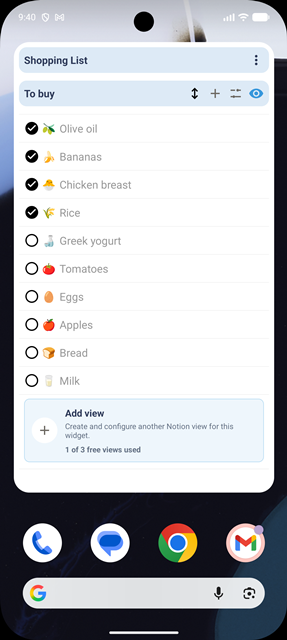
Android home screen widgets
Create a Notion widget Android setup for tasks, databases and important workflows, then review what matters without opening Notion every time. Your first widget includes every supported widget feature with no time limit. Pro adds more widgets for separate databases and parts of your life.
Custom Views
Notion Custom Views turn one database into a smaller Android view for a specific job. Custom Views, filters, sorting and other supported controls are included in your first free widget. See how Free and Pro differ on the pricing comparison.
Editable properties
NotiZen does more than display rows. Your free widget can update supported properties from the Android home screen, while full page editing and complex database changes stay in Notion.
Clean widget layout
Choose what appears in each widget so a Notion database does not become visual noise. A clean layout helps each Android home screen productivity workflow stay easy to scan.
Appearance
A light and dark mode widget is useful when readability depends on wallpaper, theme and placement. Each widget can follow the system or use a light or dark appearance from its own settings.
Filters and sorting
These controls help a Notion database widget Android setup show only the relevant rows, in the right order, with compact context at the top when metrics help. They are included in the first free widget.
Continuity and context
NotiZen also supports deeper setup continuity and calendar context for workflows that need more than a basic database glance.
Popular workflows
These examples combine Custom Views, visible properties, filters, sorting, supported editable properties and appearance settings without turning the home screen into a full Notion replacement.
Use a focused Custom View with date, checkbox and status properties so today tasks stay visible.
Pair visible properties with filters, sorting and header metrics to keep project work scannable.
Show publish dates, select fields, status and a clean widget layout for drafts and planned releases.
Keep recurring actions close with checkbox visibility and a compact Custom View for the current routine.
Turn a Notion database into a lightweight Android widget for books, articles or study material.
Use Custom Views, sorting and light or dark appearance to review the week from your home screen.
Show errands, reminders, due dates and simple status fields without opening Notion each time.
Use advanced filters and visibility controls to show only the rows that belong to the current context.
Pro
Free includes one complete widget with every supported widget feature and no time limit. Pro changes the number of widgets, not their capabilities, so you can keep separate databases, projects and workflows on your home screen.
Setup links
Use these pages when you want exact setup steps for Notion sharing, Custom Views, widgets and supported property editing.
FAQ
Short answers about Android widgets, supported property editing, relation visibility, appearance and billing.
Yes. Install NotiZen Widget, connect Notion, select the database you want to use, or a page that contains it, then choose the database inside NotiZen and add the widget from your Android launcher.
Yes. Supported property editing is included in your first free widget. Current supported types include checkbox, date, select, and status; other properties may be visible but read-only.
Yes. Each widget can use system appearance or a light or dark setting, depending on the widget configuration you choose.
Yes, relation properties can be shown as visible context when your view includes them. Treat relations as read-only unless the app explicitly supports editing that property type.
Yes, there is a Free level: one complete widget with all supported widget features and no time limit. It is not a trial. There is currently no Pro free trial.
NotiZen Pro unlocks additional widgets. Every additional widget has the same complete feature set as the free widget, so you can separate databases, projects or workflows on your Android home screen.
No. NotiZen complements Notion by making selected databases and workflow views easier to see and update from Android. Full page editing and complex workspace work still belong in Notion.